WorkTruLena’s Heart of Home Care

A business portal for a home-care agency

TruLena’s Heart of Home Care provides in-home care in Maine. Two owners, an office admin and a team of caregivers who spend their days in clients’ homes. We built one portal the whole business runs on: scheduling, timesheets, chart notes, documents, expenses and invoices.

Client
TruLena’s Heart of Home Care, Maine
What we built
A web portal for the office and the caregivers, added to the home screen on phones
Built with
React and TypeScript, Firebase on Google Cloud, Cloudflare
Live
October 2026, under Google Cloud’s HIPAA agreement

The problem

A small agency has the same obligations as a large one: every visit scheduled and covered, every hour recorded accurately for payroll and billing, every note about a client kept safe and unaltered. With a handful of staff, that work falls on the owners.

What TruLena’s needed was one place where a caregiver could clock in from a driveway, the office could see who was late, and an invoice could be built from the visits that actually happened.
What the portal does

Scheduling

Shifts and repeating schedules in Maine time, generated eight weeks ahead and topped up nightly. Conflict checks that explain themselves, availability, time off.

Shift coverage

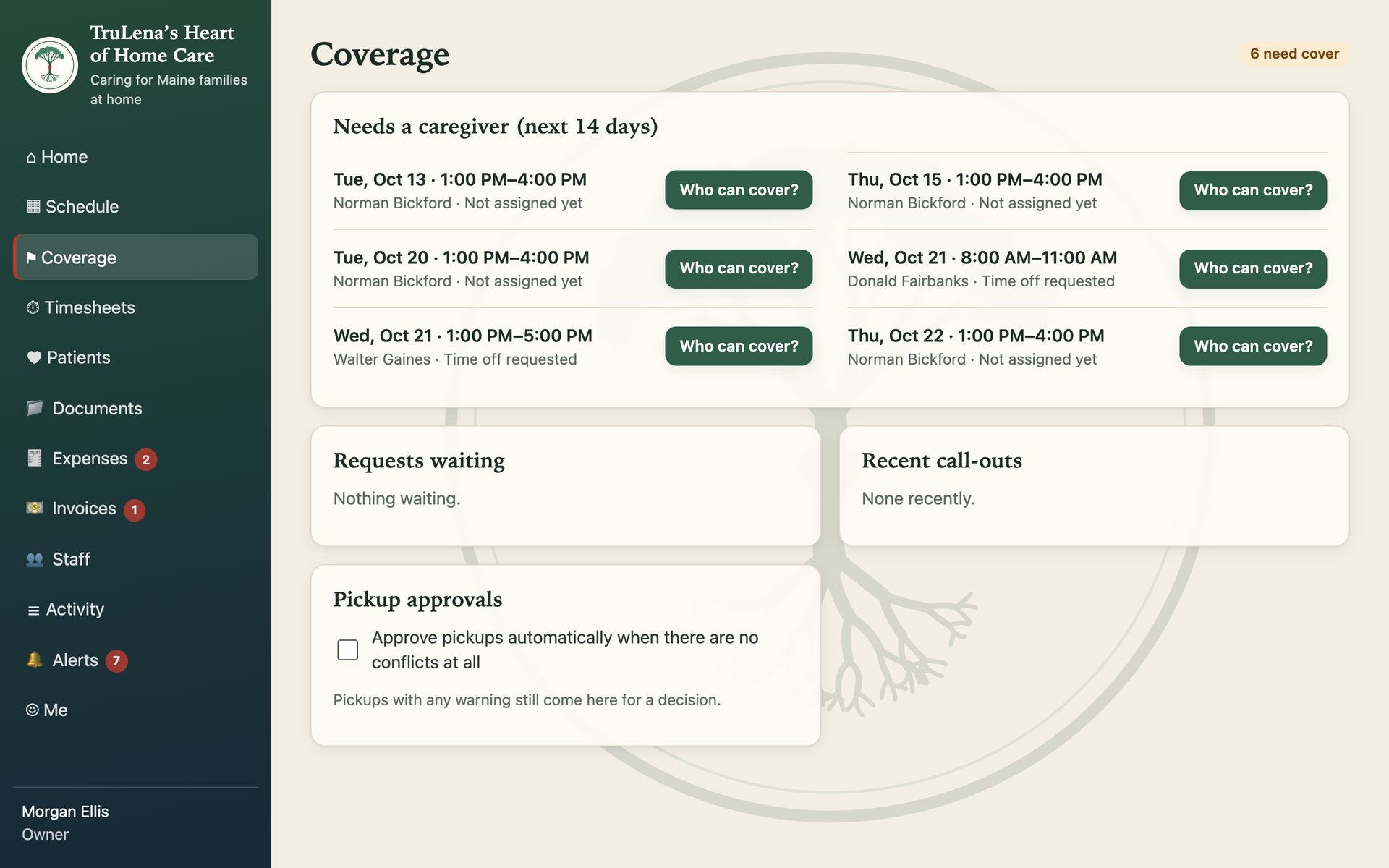
A coverage board for the next fourteen days: open and at-risk shifts, who can cover ranked by fit, pickups, call-outs, swaps and the approvals that go with them.

Clock in and out

From the caregiver’s phone, on server time. Late, missed and not-clocked-out checks alert the office. Timesheets with fixes that keep the before and after and a reason.

Chart notes

Visit, medication, incident and general notes that can never be edited or deleted, by anyone. Corrections go underneath as addenda. An incident note alerts the office at once.

Documents and photos

Camera upload with location data stripped on the phone and checked again on the server. Files get random ids, no shareable links, and every view is logged.

Expenses and mileage

Receipt photos and mileage priced at the owner’s rate, a review queue, nobody approving their own, and a clean CSV for the accountant.

Invoices and payroll

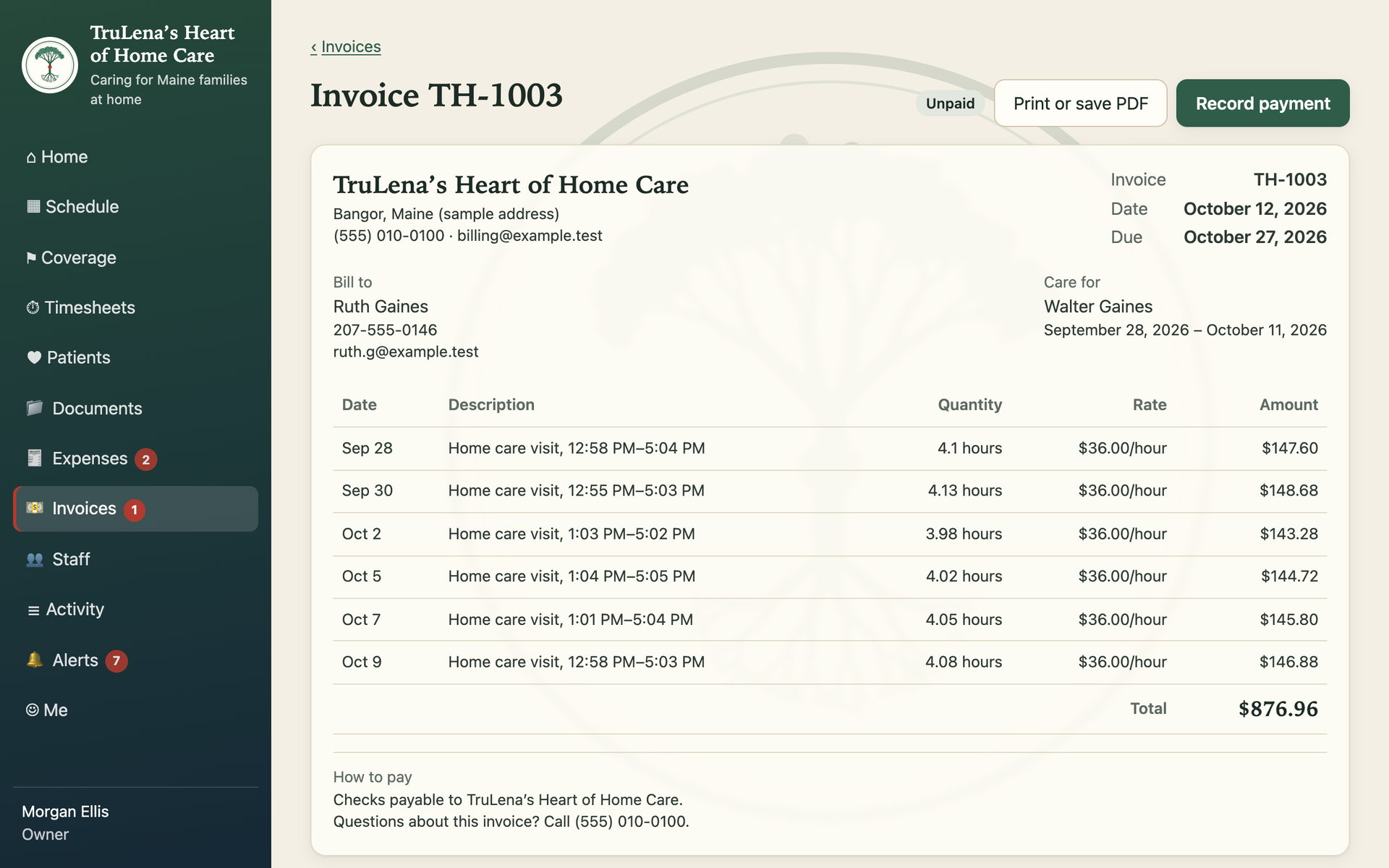
Completed visits become invoice lines once and only once. Numbered, printable invoices with payment tracking. A payroll export with overtime flagged.

Activity log

Every action recorded in plain words. The owners can filter by person, area and date, follow a link to the record, and download a range.

The coverage board: six shifts in the next fourteen days that need a caregiver, each with a Who can cover button, plus requests waiting, recent call-outs and the pickup approval setting.
The coverage board. Every open or at-risk shift for the next fourteen days, and who can fill it.
An issued invoice in the portal: the agency's details, bill-to contact, six home-care visits with hours, rate and amount, the total, and how to pay.
An invoice built from completed visits at the client’s hourly rate. Print or save as PDF from the browser. Sample data.

Built for sensitive work

Client records in home care are health records. Every protection below is enforced in the database rules and on the server, not just hidden in the app.

Roles that hold

Owners, an admin and caregivers. A caregiver sees only their own clients, and loses access the moment they are unassigned.

Two-step sign-in

An emailed link plus an authenticator code, for every member. There are no passwords to steal or reuse.

Auto sign-out

Fifteen minutes idle on a phone, thirty on a computer, and the screen is cleared.

Everything logged

Every action inside the app in the activity log; every read of client data outside it, at Google’s level.

Backups you can trust

Daily backups, point-in-time recovery for the last week, versioned file storage, and a restore proven before go-live.

Tested like it matters

588 automated tests, including a permissions matrix and attack tests across modules, plus four rounds of outside-eyes review.

How it was built

Thirteen phases, each ending with tests passing and a working version the owners could open on their phones with sample data. Nothing real went in until the owners had walked through it with sample data and signed off.

  1. Foundation: sign-in, roles, invites, activity log
  2. Clients and caregiver assignments
  3. Scheduling
  4. Shift coverage and alerts
  5. Clock in and out, timesheets
  6. Chart notes
  7. Documents and photos
  8. Expenses and mileage
  9. Invoices and payroll export
  10. Dashboard and activity log
  11. QA pass: phone widths, large text, attack tests
  12. Owner walkthrough and sign-off
  13. Move to Google Cloud, backups proven, go live

Run a business like this one?

Home care, a clinic, a trade crew, a small practice. If your week runs on texts and a spreadsheet, tell us about it.

Email info@phoenixckk.com